My payment succeeded, but my plan has not updated. What should I do?
Refresh your Viora plan after checkout and check that you are using the right account.

Written by Nexmoe
Updated
After a successful checkout, Viora refreshes your subscription information. If the desktop app still shows Free, check the account and return to the app before attempting another purchase.
Return to the desktop app
If you opened checkout from Viora:
- Keep the payment success page open.
- Select Return to Viora and allow your browser to open the app if prompted.
- Bring Viora’s main window to the front and check your plan again.
Viora also refreshes the plan when you return to its main window after opening billing from the app. If the browser cannot open Viora, open the app yourself. Restarting the app triggers another plan check after sign-in.
Confirm the account used for payment
In the desktop app, open Settings and check the email and plan in the Account row. Then open billing settings in your browser and check that you are signed in with that same email.
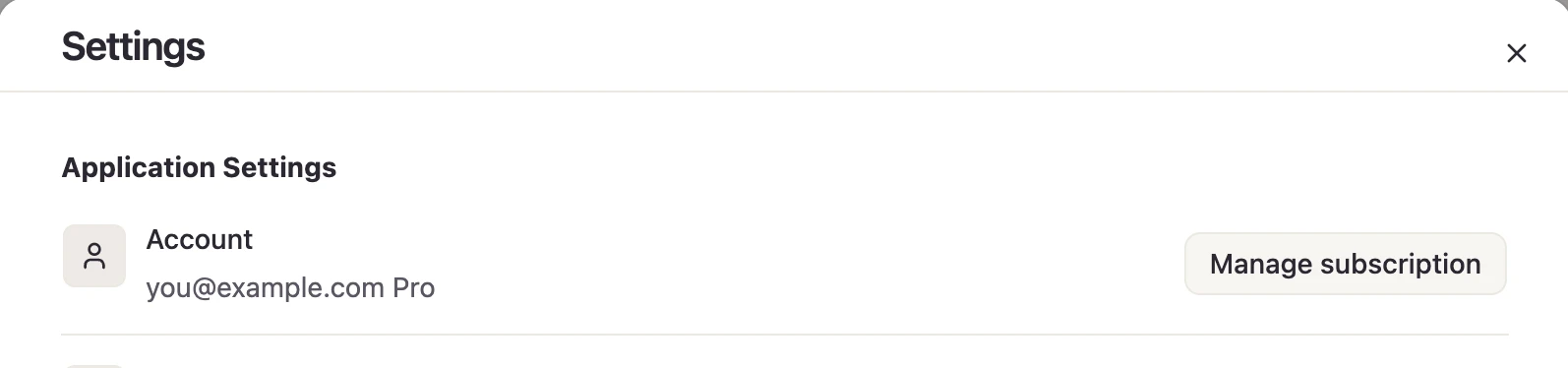
If you use more than one Viora account, a purchase on one account will not appear when you view another account. Sign in to the account you used at checkout.
Check billing in the browser
Look for your current plan and subscription status. If the billing page reports a loading error, use Retry. Check your internet connection before retrying.
If the browser shows the paid plan but the desktop app does not, return to Viora or restart it. If neither shows the purchase, keep your payment receipt and contact support.
Still showing the wrong plan?
Contact Viora support with:
- The email address used for your Viora account.
- The purchase date and receipt or invoice reference.
- Whether the website, desktop app, or both show the wrong plan.
- Your Viora app version and any error message you see.
Do not purchase the same plan again just to refresh the display. Support can use the original payment details to investigate.